Topics

May 26, 2026
.png)


May 26, 2026
Finding the right participants for your study can be tricky, and it’s often the first roadblock researchers encounter when trying to get a project up and running.
We actually ran a study and found that 57% of participants said that finding the right participants was one of their biggest constraints to conducting high-quality UX research (via The Business Case for Investing in Quality UX Research).
But staring at that blank screener can be extremely daunting. “What questions should I ask? How do I set this up?” There is a lot to consider when sourcing the right participants, and even a seemingly straightforward screener can feel difficult to design at times.
As an Onboarding Specialist at Dscout, I help new customers navigate the Dscout platform. Part of my role involves reviewing new users’ first screeners, which is a critical one to get right!
I provide first-time user coaching to ensure that folks follow best practices and help them reach the right people. A bad recruit can quickly lead to bad data and potentially misaligned product decisions. So the screener is a big deal!
In my time coaching, I’ve found a handful of common obstacles that can derail a screener. Below, I’ll take you through each one and help make sure you don’t fall into their trap.
Some experience research tools (like Dscout) offer Target Attributes—one of the best ways to recruit the right participants without adding a bunch of screener questions.
When participants create a profile, they fill out two types of attributes:
From there, researchers can apply Target Attributes to zero in on exactly who they want to reach. Instead of asking "Do you work full-time?" or "Do you have a college degree?"—just set those as Target Attributes and let the platform do the filtering for you. It gets the right people in front of your study faster.
Here's how each type works.
Note: These examples reflect how Target Attributes work in Dscout.
Primary attributes include:
These are your most reliable filters. If you're looking for women over 25 with a college degree who work full-time, set those as Target Attributes—anyone who doesn't match won't see your study, and you won't need to ask a single screener question to get there.
Non-primary attributes include:
These are still extremely useful, but use them thoughtfully. It can be very tempting to over-filter and limit your reach.
At some point, you may feel the need to collect PII (Personally Identifiable Information) in your screener. Commonly asked questions that are not allowed to be collected in a Dscout screener include:
But why can’t you ask this in a screener? Aside from protecting participant privacy, screeners are usually unpaid, and they don’t guarantee a spot in the study. It’s important to respect a participant’s time and privacy, and we don’t want to ask for PII if we don’t even know whether they’ll complete the study.
Other examples of PII include…
If you absolutely need this information up front, you can ask for consent to collect their information in the screener and save the more sensitive requests for the study.
One example is verifying that the participant is actually a customer of the product you’re studying. In this scenario, you would need their email address in the screener.
Here’s how that question could look:
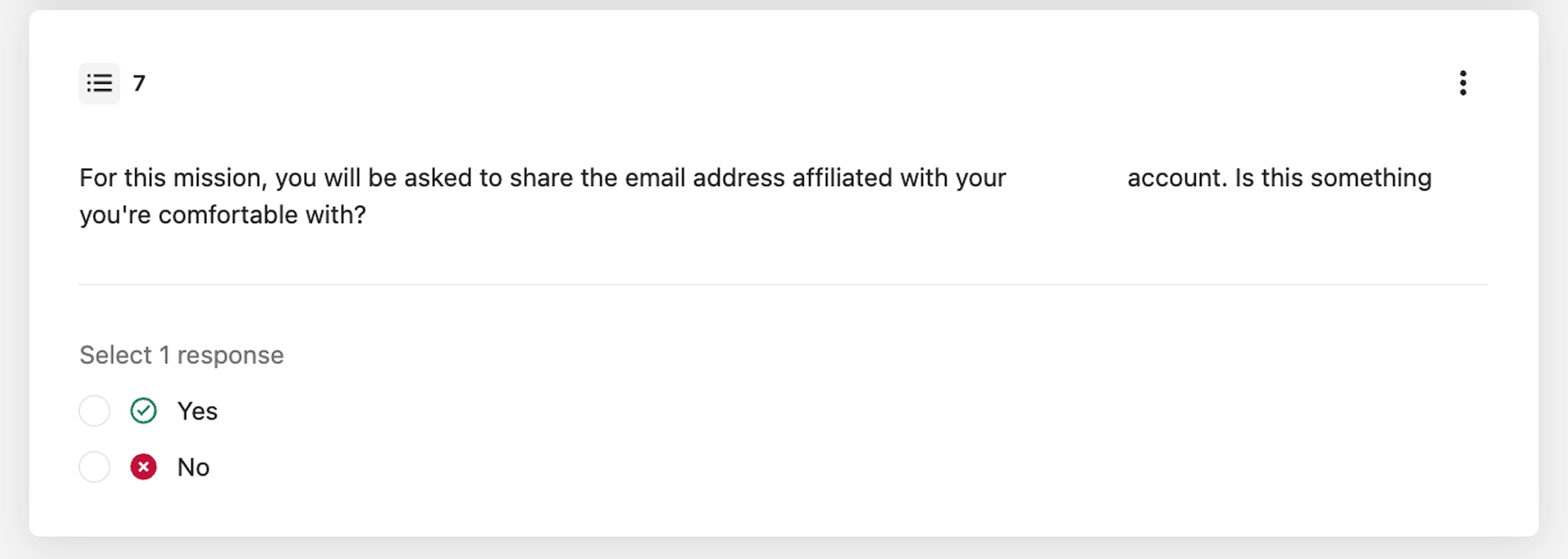
Additionally, you can leverage media questions to verify information without collecting PII.
Sticking with this example, imagine you want proof that a prospective participant has an account with the organization. In the screener, you can ask them to upload a screen recording of them opening the company’s app on their phone and scrolling through their feed. This allows you to verify they’re an app user, all without collecting their email in the screener.
As a researcher, you want to protect participants' data as much as possible. So if you don’t absolutely need it, I’d encourage you to skip asking for it.
Even though you want to quickly find the participants you’re looking for, it’s always better to keep your titles and screener descriptions vague.
Participants are looking to qualify for as many studies as they can, and some (unfortunately) will answer questions in ways that they think will earn them a spot, even if it isn’t truthful.
Plus, with the rise of AI and bots, this is crucial for reducing participant bias and receiving honest answers to your screeners.
Imagine you’re working on a usability test about smart home devices, and you’re specifically interested in speaking with folks who are big users of the (fake) smart home device, Janet.
While it may be tempting to title your screener “Janet Users,” it’s important that you don’t!
Instead, pick a fun title that generally speaks to your recruitment criteria without giving it all away. Titles like “Calling smart-home device users” or “Smart Homes Devices and You” give participants a vague idea of what you’re looking for, but don’t tell participants which answers will earn them a spot (e.g., select usage for multiple times a day, select Janet ownership, etc.)
You’ll also want to be vague in your teaser for these same reasons. Rather than explicitly telling prospective participants you want to speak to Janet owners who use their device(s) multiple times a day, you can phrase it as, “Answer a few questions about the smart devices you own for a chance to participate in an upcoming Usability test!”
This lets prospective participants know what kind of study they’ll be invited to and what devices you’re asking about, without telling them which answers will qualify them for the study.
Consider all titles as participant-facing. While you may feel tempted to title your screener the same thing you call it internally (e.g., Phase C: Card Sorting Test), this could lead to some confusion for participants.
Instead, title your screener something engaging and participant-friendly. Think about using puns or plays on words. Some examples:
We recognize that having a fun title may make it hard to remember which internal project this is tied to, which is why we recommend using an Internal Title Name feature (if your platform offers it).
Each screener and study on Dscout has the ability to have an Internal Title name that is visible only to your team. This way, you can name your screener something fun while keeping organized internally.
It can be hard to tell what the difference is between “Skip” logic and “Skip to end” logic. Both are available in screeners, but they serve very different purposes.
Skip logic allows you to route participants to a different question in your screener. For instance, in Dscout you can skip participants from Q1 to Q3.
Skip to End logic, however, ends the screener for participants. While this may sound similar to termination logic, it is not. When you use skip to end logic, it does not terminate your scout, it merely ends the screener for them. In doing this, they will still count toward your application limit, and are considered “Eligible” for the study.
Only use Skip to End logic when you don’t have additional questions for a participant, and are okay with them still qualifying for the study. If you’re trying to terminate them, you’ll need to use Knockout logic.
When setting up a screener, questions that pertain to quotas and demographics are going to take priority. After all, these are what you need to recruit the right people! However, don’t forget to include some form of articulation question in your screener. This will allow you to gauge how expressive a participant is on the topic at hand.
At Dscout, you have the option to leverage open-ends and 1 video question in your screeners. Take a look at some examples below to see how we leverage these question prompts to capture thoughtful responses from perspective participants:
By asking these questions, I have two opportunities to see how much prospective participants have to say, and it helps me make a more informed choice when it comes to selecting participants for my study.
Imagine you’re torn between two applications for the last spot in the study. If you only have their closed-ended responses, you’ll only have those questions to go off of when it comes to deciding who to invite to your study. However, since you set up articulation questions, you can see that one applicant wrote a few paragraphs to the open-end while one only wrote one sentence.
Thanks to that question, you know that the first applicant would be better suited to your upcoming study.
When setting up your study, it’s important to remember that the topics and tools you deal with on a daily basis could be brand new to participants. What may seem normal to you could feel intimidating to them, which is why it’s always a good idea to gauge their comfort levels in a screener.
For instance, imagine you want to run a study where you will ask participants to post an item for sale on an online marketplace. You may just think you need to confirm they have an account, but let’s take it one step further. It’s possible this is a task they aren’t comfortable doing, and it would be better to screen those people out now before they get invited to your study.
How comfortable are you with posting items for sale online?
Additionally, participants may not want to perform certain tasks that are vital for your study. Take AI, for example. It’s a popular topic these days, and the space is rapidly expanding. You may be recruiting for a study where you ask people to perform tasks on an AI tool. Nothing too crazy, right?
But what if a participant is opposed to using AI due to ethical or environmental concerns? It’s important to capture that in your screener so you don’t end up inviting them to your study. Questions like this could be the difference between having to backfill participants or having everyone complete the study on time.
Which of the following statements best describes your perspective on artificial intelligence (AI)?
As part of this study, you may be asked to try an AI-powered tool. How comfortable would you be doing this?
Quotas are an important tool for recruiting the right people to your study, but it’s important to be strategic about how you use them.
Keep in mind that Dscout distributes manual screeners to 5× more applicants than you need for the study, so you can typically achieve your desired balance by selecting from a larger pool, rather than relying on strict quotas. In other words, you may only need n=10 to complete your study, but you’ll get n=50 applications. This means you’ll be able to hand-pick folks to meet certain criteria.
We recommend saving quotas for the more niche recruitment stuff, or things you know will be difficult to find. An example of when to not use quotas if you want a variety of ages and backgrounds for a broad usability test. You can just review applicants and pick a balanced set without forcing the screener to stop accepting certain people.
Another instance to not use quotas is you prefer a spread of iOS/Android users, but either works—so you can cherry-pick later.
Maybe you’re looking to recruit people who have a reusable water bottle, but you know Ola is really popular right now. You want to ensure you hear from owners of other brands too (Hydroflask, Yeti, etc.). You could set up an “at most” quota on Ola to ensure there’s still room for other participants.
You have an auto-recruit media survey, and you want 5 completes to be with current customers and 5 completes to be with churned customers. Without a quota, you might end up hearing from mostly current customers. Here, you could set up an “equal to” quota to ensure you get an equal mix of current and former customers.
You’re running interviews this week and want to speak to decision makers at small businesses. You want to speak with at least one Founder. You’d set up an “at least” quota to reserve 1 spot in the screener for a Founder.
If it’s a study-critical segment you must hit, use a quota—but keep it to 2–3 quota questions max so recruiting stays fast. Otherwise, it can slow down your application rate.
Everything we’ve covered today is designed to help you source the best participants possible for your study. By putting in the hard work now, you’re setting yourself up for success when it comes time to actually field your study.
As you work on building out your screener, don’t give too much away in your title or teaser. Instead, focus on designing questions that will help you narrow in on participants that are ideal for your study. If applicable, ask a question that captures their comfort level completing relevant tasks. Be sure to take advantage of the articulation questions Dscout lets you add to screeners—open-ended questions, a photo question, and a video question—to ensure you’ll get high-quality responses in the mission itself.
Dscout customers, want a second set of eyes? Submit your screener for review by a member of the Dscout team! We’re happy to take a look and leave specific, detailed feedback on your screener before you launch it.
Once your screener is launched, you get to move onto the fun part: reviewing applications. Check out this helpful guide on how to make scout selection a breeze.